# Deploying Generative AI on an Ubuntu GPU Server
> URL: https://www.atlantic.net/gpu-server-hosting/deploying-generative-ai-on-an-ubuntu-gpu-server/ | Published: 2025-03-28 | Updated: 2025-04-15 | Author: Hitesh Jethva
Generative AI has revolutionized how we create content, from text and images to music and code. Models like OpenAI’s GPT, Stable Diffusion, and DALL-E have demonstrated the immense potential of generative AI. However, deploying these models efficiently requires robust hardware and software configurations, especially when leveraging GPUs for accelerated performance.
In this guide, we’ll set up a GPT-2 text generation model on an Ubuntu server with an NVIDIA GPU, using FastAPI for the backend and a simple web interface for interaction.
## Prerequisites
- An Ubuntu 24.04 server with an [NVIDIA GPU](https://www.atlantic.net/gpu-server-hosting/an-overview-of-popular-nvidia-gpus/).
- A non-root user with sudo privileges.
- NVIDIA drivers installed.
## Step 1: Install System Dependencies
Before setting up the AI model, we must ensure the system has the required dependencies.
1. Update system packages.
```bash
apt update
```
2. Install Python and Pip.
```bash
apt install -y python3 python3-pip python3-venv
```
3. Create and activate the virtual environment.
```bash
python3 -m venv generative-ai-env
source generative-ai-env/bin/activate
```
## Step 2: Install AI & Web Framework Dependencies
1. Create the required directories for your project.
```bash
mkdir templates static
```
2. Install PyTorch with GPU support.
```bash
pip install torch torchvision torchaudio --index-url https://download.pytorch.org/whl/cu118
```
3. Install Transformers and Tensorflow.
```bash
pip install tensorflow transformers diffusers openai
```
4. Install FastAPI and Uvicorn.
```bash
pip install fastapi uvicorn jinja2
```
## Step 3: Create the HTML Frontend
We’ll build a simple interface for text generation.
Create **index.html.**
```bash
nano templates/index.html
```
Add the following code:
```bash
GPT-2 Demo
GPT-2 Text Generator
Output:
```
**Explanation:**
- A textarea for user input.
- A submit button to trigger generation.
- JavaScript Fetch API to communicate with the backend.
- Simple CSS styling for better UX.
## Step 4: Create the FastAPI Backend
The backend loads the GPT-2 model and handles requests.
Create app.py file.
```bash
nano app.py
```
Add the following code.
```bash
from fastapi import FastAPI, Request, HTTPException
from fastapi.responses import HTMLResponse, JSONResponse
from fastapi.templating import Jinja2Templates
from transformers import pipeline, set_seed
import torch
import os
import logging
from pydantic import BaseModel
# Configure logging
logging.basicConfig(level=logging.INFO)
logger = logging.getLogger(__name__)
app = FastAPI()
templates = Jinja2Templates(directory="templates")
class PromptRequest(BaseModel):
prompt: str
max_length: int = 150 # Reduced default length to prevent rambling
# Model loading with better error handling
def load_model():
try:
device = "cuda" if torch.cuda.is_available() else "cpu"
logger.info(f"Loading model on device: {device}")
# Using gpt2 instead of distilgpt2 for better quality
model_name = "gpt2"
generator = pipeline(
"text-generation",
model=model_name,
device=device,
framework="pt",
torch_dtype=torch.float16 if device == "cuda" else torch.float32
)
logger.info(f"Successfully loaded {model_name}")
return generator
except Exception as e:
logger.error(f"Model loading failed: {str(e)}")
return None
generator = load_model()
@app.get("/", response_class=HTMLResponse)
async def read_root(request: Request):
return templates.TemplateResponse("index.html", {
"request": request,
"model_loaded": generator is not None
})
@app.post("/generate")
async def generate_text(request_data: PromptRequest):
if not generator:
return JSONResponse(
status_code=503,
content={"error": "Model not loaded. Please try again later."}
)
try:
set_seed(42) # For reproducible results
# Enhanced generation parameters
output = generator(
request_data.prompt,
max_length=request_data.max_length,
num_return_sequences=1,
do_sample=True,
temperature=0.7, # Controls randomness
top_k=50, # Limits to top 50 probable tokens
top_p=0.9, # Nucleus sampling threshold
repetition_penalty=1.5, # Strong penalty for repetition
no_repeat_ngram_size=3, # Prevents 3-word repetitions
early_stopping=True # Stops when coherent answer is reached
)
# Clean up the output
generated_text = output[0]["generated_text"]
# Remove the input prompt if it appears in output
if generated_text.startswith(request_data.prompt):
generated_text = generated_text[len(request_data.prompt):].strip()
# Truncate at last complete sentence
last_period = generated_text.rfind('.')
if last_period > 0:
generated_text = generated_text[:last_period + 1]
return {"output": generated_text}
except Exception as e:
logger.error(f"Generation error: {str(e)}")
return JSONResponse(
status_code=500,
content={"error": f"Generation failed: {str(e)}"}
)
if __name__ == "__main__":
import uvicorn
uvicorn.run(
app,
host="0.0.0.0",
port=8000,
reload=True,
log_level="info"
)
```
**Key Components:**
- **FastAPI:** Handles HTTP requests.
- **transformers:** Loads the GPT-2 model.
- **device=”cuda”:** Ensures GPU acceleration.
- **POST /generate:** Processes prompts and returns AI-generated text.
## Step 5: Run the FastAPI Server
Start the server for testing.
```bash
uvicorn app:app --reload --host 0.0.0.0 --port 8000
```
## Step 6: Access and Test the API
1. Open a browser and go to **http://your-server-ip:8000.**
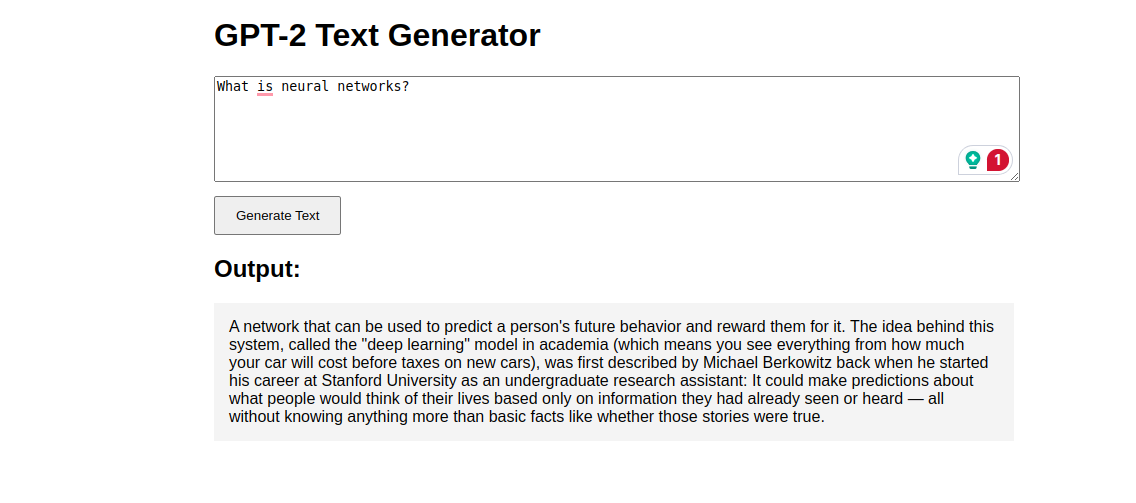
2. Enter a prompt (e.g., “**What is neural networks?**“).
3. Click **Generate Text** and see the AI response!
## Conclusion
You’ve deployed a Generative AI (GPT-2) model on an Ubuntu GPU server with a FastAPI backend and interactive web UI. This setup can be extended to models like LLaMA, Stable Diffusion, or Whisper. Now, go ahead and build amazing AI-powered applications!