# Mobile Phone Price Prediction Using Machine Learning on Ubuntu 24.04 GPU Server
> URL: https://www.atlantic.net/gpu-server-hosting/mobile-phone-price-prediction-using-machine-learning-on-ubuntu-24-04-gpu-server/ | Published: 2025-07-24 | Updated: 2026-05-04 | Author: Hitesh Jethva
Predicting mobile phone prices is an interesting machine learning task with real-world applications, such as helping buyers, sellers, and e-commerce platforms estimate fair market value based on device specifications. Instead of manually comparing phone features and market rates, we can train a machine learning model to analyze patterns in the data and predict prices automatically.
In this guide, we’ll build a mobile phone price prediction system using Python, XGBoost, and Flask on an Ubuntu 24.04 GPU server.
## Prerequisites
- An Ubuntu 24.04 server with an NVIDIA GPU.
- A non-root user or a user with sudo privileges.
- NVIDIA drivers are installed on your server.
## Step 1: Prepare the Server Environment
Before we can start building and deploying our mobile phone price prediction system, we need to set up a working Python environment on our Ubuntu 24.04 GPU server.
1. We’ll start by installing Python, pip, and essential build tools.
```bash
apt install -y python3 python3-pip python3-venv git build-essential
```
2. Create and activate a virtual environment.
```bash
python3 -m venv mobile-predict-env
source mobile-predict-env/bin/activate
```
3. It’s a good idea to make sure pip is updated before installing libraries.
```bash
pip install --upgrade pip
```
4. Finally, install all the Python libraries needed for this project, including Flask for the web server, pandas and numpy for data processing, scikit-learn and XGBoost for machine learning, and matplotlib and seaborn for visualization.
```bash
pip install flask pandas numpy matplotlib seaborn scikit-learn xgboost
```
## Step 2: Download the Dataset
Now that your environment is ready, it’s time to get the dataset onto the server so we can train our machine learning model.
1. First, download the [**mobile dataset**](https://www.kaggle.com/code/xyzaraa/mobile-phone-price-prediction/input) from Kaggle on your local machine.
2. Use scp to upload the dataset from your local machine to the server.
```bash
scp Downloads/mobile.csv root@your-server-ip:/root/
```
This will upload **mobile.csv** directly to the **/root/** directory on your server.
## Step 3: Build the Machine Learning Model
With the dataset now on your server, we can create a Python script that prepares the data, engineers useful features, and trains a machine learning model to predict mobile phone prices.
1. Create model.py.
```bash
nano model.py
```
Add the following code:
```bash
# model.py
import pandas as pd
import numpy as np
import re
from sklearn.model_selection import train_test_split
from sklearn.pipeline import Pipeline
from sklearn.preprocessing import OneHotEncoder, StandardScaler
from sklearn.compose import ColumnTransformer
from sklearn.impute import SimpleImputer
from sklearn.linear_model import LinearRegression
import xgboost as xgb
class PricePredictor:
def __init__(self, csv_path='mobile.csv'):
self.df = pd.read_csv(csv_path)
self.model = None
self.preprocessor = None
self.prepare_data()
self.train_model()
def prepare_data(self):
df = self.df
df.fillna('Unknown', inplace=True)
# Handle outliers for Spec Score
q1 = np.percentile(df['Spec Score'], 25)
q3 = np.percentile(df['Spec Score'], 75)
iqr = q3 - q1
lower_bound = q1 - 1.5 * iqr
df['Spec Score'] = np.where(df['Spec Score'] < lower_bound, lower_bound, df['Spec Score'])
# Feature engineering
df['Battery_mAh'] = df['battery'].apply(lambda x: self.extract_value(x, r'(\d+)\s*mAh'))
df['Display_Inches'] = df['display'].apply(lambda x: self.extract_value(x, r'(\d+\.?\d*)\s*(?:inch|inches|")'))
df['Camera_MP'] = df['camera'].apply(lambda x: self.extract_value(x, r'(\d+)\s*MP'))
df_storage = df['storage'].apply(self.extract_ram_rom)
df = pd.concat([df, df_storage], axis=1)
df['Processor_Brand'] = df['processor'].apply(self.extract_processor_brand)
df['Version_Main'] = df['version'].apply(self.extract_version_main)
# FIX: Replace inplace fillna with safe assignment
for col in ['Battery_mAh', 'Display_Inches', 'Camera_MP', 'RAM_GB', 'Internal_Storage_GB']:
df[col] = df[col].fillna(0)
self.df = df
self.numerical_features = ['Spec Score', 'rating', 'Battery_mAh', 'Display_Inches', 'Camera_MP', 'RAM_GB', 'Internal_Storage_GB']
self.cat_features = ['tag', 'sim', 'memoryExternal', 'Processor_Brand', 'Version_Main']
self.target = 'price'
def extract_value(self, text, pattern):
match = re.search(pattern, text, re.IGNORECASE)
return float(match.group(1)) if match else np.nan
def extract_ram_rom(self, text):
text = str(text).lower()
ram, rom = np.nan, np.nan
ram_match = re.search(r'(\d+)\s*gb\s*ram', text)
if ram_match:
ram = int(ram_match.group(1))
rom_match = re.search(r'(\d+)\s*gb\s*(inbuilt|storage)?', text)
if rom_match:
rom = int(rom_match.group(1))
return pd.Series({'RAM_GB': ram, 'Internal_Storage_GB': rom})
def extract_processor_brand(self, text):
text = str(text).lower()
if 'snapdragon' in text: return 'Snapdragon'
elif 'dimensity' in text: return 'Dimensity'
elif 'helio' in text: return 'Helio'
elif 'exynos' in text: return 'Exynos'
elif 'a series' in text or 'apple' in text: return 'Apple A Series'
elif 'kirin' in text: return 'Kirin'
elif 'unisoc' in text: return 'Unisoc'
else: return 'Other'
def extract_version_main(self, text):
text = str(text).lower()
match = re.search(r'android\s*(\d+)', text)
if match:
return f"Android {match.group(1)}"
return 'Other'
def train_model(self):
df = self.df
X = df[self.numerical_features + self.cat_features]
y = pd.to_numeric(df[self.target], errors='coerce')
X_train, X_test, y_train, y_test = train_test_split(X, y, test_size=0.2, random_state=42)
num_pipeline = Pipeline([
('imputer', SimpleImputer(strategy='median')),
('scaler', StandardScaler())
])
cat_pipeline = Pipeline([
('imputer', SimpleImputer(strategy='most_frequent')),
('encoder', OneHotEncoder(handle_unknown='ignore'))
])
self.preprocessor = ColumnTransformer([
('num', num_pipeline, self.numerical_features),
('cat', cat_pipeline, self.cat_features)
])
pipeline = Pipeline([
('preprocessor', self.preprocessor),
('regressor', xgb.XGBRegressor(random_state=42))
])
pipeline.fit(X_train, y_train)
self.model = pipeline
def predict(self, input_data):
df_input = pd.DataFrame([input_data])
pred_price = self.model.predict(df_input)[0]
return round(pred_price, 2)
```
This script will perform the following tasks:
- Load the dataset (mobile.csv)
- Handle missing values and outliers
- Extract numerical features from text fields (like battery or display)
- Encode categorical variables
- Train a regression model using XGBoost
- Provide a prediction method for future use
## Step 4: Build the Web Application with Flask
Now that we have a trained machine learning model, it’s time to build a simple web interface that allows users to input mobile phone specifications and receive an instant price prediction.
1. Create app.py.
```bash
nano app.py
```
Add the following code.
```bash
# app.py
from flask import Flask, render_template, request
from model import PricePredictor
import pandas as pd
app = Flask(__name__)
predictor = PricePredictor('mobile.csv')
@app.route('/', methods=['GET', 'POST'])
def index():
predicted_price = None
if request.method == 'POST':
input_data = {
'Spec Score': float(request.form['spec_score']),
'rating': float(request.form['rating']),
'Battery_mAh': float(request.form['battery']),
'Display_Inches': float(request.form['display']),
'Camera_MP': float(request.form['camera']),
'RAM_GB': float(request.form['ram']),
'Internal_Storage_GB': float(request.form['rom']),
'tag': request.form['tag'],
'sim': request.form['sim'],
'memoryExternal': request.form['memory_external'],
'Processor_Brand': request.form['processor_brand'],
'Version_Main': request.form['version_main']
}
predicted_price = predictor.predict(input_data)
return render_template('index.html', predicted_price=predicted_price)
if __name__ == '__main__':
app.run(host='0.0.0.0', port=5000, debug=True)
```
2. Flask looks for HTML templates in a folder called templates. Let’s create it.
```bash
mkdir templates
```
3. Now create the HTML file inside the templates folder.
```bash
nano templates/index.html
```
Add the following code.
```bash
Mobile Price Predictor
📱 Mobile Phone Price Prediction
{% if predicted_price %}
💸 Predicted Price: ₹{{ predicted_price }}
{% endif %}
```
## Step 5: Run the Application
1. With your Flask app and HTML template set up, you’re now ready to run the application and start serving predictions.
```bash
python3 app.py
```
By default, this will start the Flask server on port **5000** and listen on all network interfaces (0.0.0.0), making it accessible from your browser.
2. Open your web browser and access the Flask app using the URL **http://your-server-ip:5000.** You should see a simple web form asking you to enter various specifications (like RAM, battery capacity, display size, etc.) for a mobile phone.
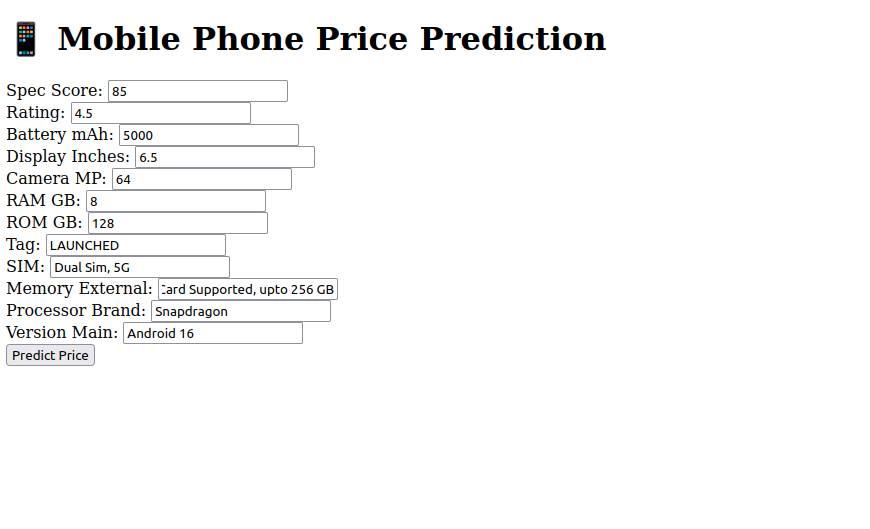
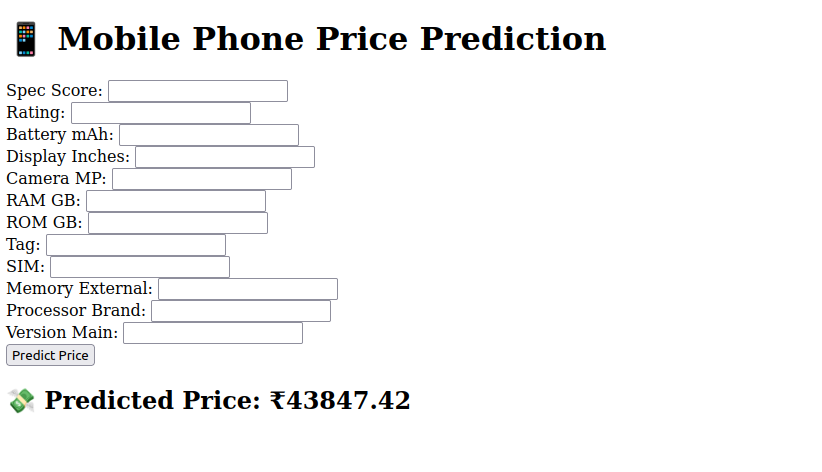
3. Once you fill out the form, click on **Predict Price.** The trained XGBoost regression model processes the input and returns a predicted mobile phone price, which is displayed right on the page.
## Conclusion
In this article, we built a complete mobile phone price prediction system from scratch using Python, XGBoost, and Flask on an Ubuntu 24.04 [GPU server](https://www.atlantic.net/gpu-server-hosting/). We prepared the server environment, downloaded and processed a real-world dataset, trained a regression model, and deployed a user-friendly web interface for real-time predictions.