# How to Install and Configure GlusterFS on CentOS 7/CentOS 8
> URL: https://www.atlantic.net/vps-hosting/how-to-install-configure-glusterfs-centos-7-8/ | Published: 2015-02-04 | Updated: 2026-03-03 | Author: Andrew Mora
##### Verified and Tested 03/10/21
### Introduction
Quick installation of GlusterFS on Centos 7.x and 8.x. GlusterFS clusters together storage building blocks over Infiniband RDMA or TCP/IP interconnect, aggregating disk and memory resources and managing data in a single global namespace.
### Prerequisites
You’ll need a separate hard disk(s) or virtual disk(s) to use as glusterfs storage mount point(s).
## Installing and Configuring GlusterFS on CentOS 7
Install XFS file system
```
yum install xfsprogs -y
```
Install and Enable GlusterFS official repository
```
yum -y install centos-release-gluster40
sed -i -e "s/enabled=1/enabled=0/g" /etc/yum.repos.d/CentOS-Gluster-4.1.repo
```
Install GlusterFS via YUM
```
yum --enablerepo=centos-gluster41 -y install glusterfs-server
```
Partition, format and mount your GlusterFS Volume. In this case our “extra harddisk/virtual disk” is /dev/sdb/. NOTE: I will not be going into detail about how to partition your harddisk, as it is out of the scope of this article. We will be using the FDISK utility to partition /dev/sdb. Also note that you may choose your partitioning scheme as you please. For the sake of simplicity, we’ll be creating a single large partition /deb/sdb1
```
fdisk /dev/sdb
```
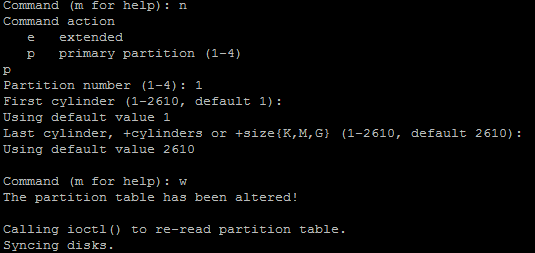
Sample Fdisk Operation
Create a new Primary or extended partition, write it to the disk and exit the FDISK utility.
Proceed to format the disk in XFS.
```
mkfs.xfs /dev/sdb1 -f
```
Add your new disk to /etc/fstab so that the disk is mounted at boot time
```
echo "/dev/sdb1 /export/brick1 xfs defaults 1 2" >> /etc/fstab
```
```
mount -a && mount
```
Start the GlusterFS daemon and make sure it starts upon boot time.
```
systemctl start glusterd
systemctl enable glusterd
```
Now, verify the GlusterFS version with the following command:
```
gluster --version
```
Output:
```
glusterfs 4.1.9
Repository revision: git://git.gluster.org/glusterfs.git
Copyright (c) 2006-2016 Red Hat, Inc.
GlusterFS comes with ABSOLUTELY NO WARRANTY.
It is licensed to you under your choice of the GNU Lesser
General Public License, version 3 or any later version (LGPLv3
or later), or the GNU General Public License, version 2 (GPLv2),
in all cases as published by the Free Software Foundation.
```
## Installing and Configuring GlusterFS on CentOS 8
Install XFS file system
```
dnf install xfsprogs -y
```
Install and Enable GlusterFS official repository
```
dnf -y install centos-release-gluster8
sed -i -e "s/enabled=1/enabled=0/g" /etc/yum.repos.d/CentOS-Gluster-8.repo
```
Install GlusterFS via DNF
```
dnf --enablerepo=centos-gluster8,PowerTools -y install glusterfs-server
```
Partition, format and mount your GlusterFS Volume. In this case our “extra harddisk/virtual disk” is /dev/sdb/. NOTE: I will not be going into detail about how to partition your harddisk, as it is out of the scope of this article. We will be using the FDISK utility to partition /dev/sdb. Also note that you may choose your partitioning scheme as you please. For the sake of simplicity, we’ll be creating a single large partition /deb/sdb1
```
fdisk /dev/sdb
```

Sample Fdisk Operation
Create a new Primary or extended partition, write it to the disk and exit the FDISK utility.
Proceed to format the disk in XFS.
```
mkfs.xfs /dev/sdb1 –f
```
Add your new disk to /etc/fstab so that the disk is mounted at boot time
```
echo "/dev/sdb1 /export/brick1 xfs defaults 1 2" >> /etc/fstab
```
```
mount -a && mount
```
Start the GlusterFS daemon and make sure it starts upon boot time.
```
systemctl start glusterd
systemctl enable glusterd
```
Now, verify the GlusterFS version with the following command:
```
gluster --version
```
Output:
```
glusterfs 8.3
Repository revision: git://git.gluster.org/glusterfs.git
Copyright (c) 2006-2016 Red Hat, Inc.
GlusterFS comes with ABSOLUTELY NO WARRANTY.
It is licensed to you under your choice of the GNU Lesser
General Public License, version 3 or any later version (LGPLv3
or later), or the GNU General Public License, version 2 (GPLv2),
in all cases as published by the Free Software Foundation.
```
Congratulations you have installed and configured GlusterFS on CentOS 7 and CentOS 8. We hope this article assisted you with the process. Thank you for following this How-To. Check back for updates and more interesting Centos how-to’s or learn more about our reliable [VPS hosting](https://www.atlantic.net/vps-hosting/) solutions.