
Hermes Agent is an open-source, autonomous AI assistant developed by Nous Research. Unlike a basic chatbot, Hermes Agent can execute shell commands, search the web, generate images, work with files, run code, remember user preferences, connect to messaging platforms, and perform scheduled automation tasks.
You can complete a basic Hermes Agent setup on an Ubuntu desktop, home server, cloud VPS, or other remote server. After installation, Hermes can be accessed through its command-line interface, terminal UI, desktop app, web interface, or messaging gateways such as Telegram, Discord, Slack, WhatsApp, and Signal.
This tutorial explains two ways to install Hermes Agent on an Ubuntu server. The first uses Atlantic.Net’s Hermes Marketplace Application, while the second performs a local install with the official one-line installer. You will also configure a model provider, validate the installation, start the gateway, and create recurring tasks.
Method 1 – Install With Atlantic.Net’s Hermes Marketplace Application
The Marketplace method is the fastest option because Atlantic.Net provisions a remote server with Hermes already installed.
Sign in to the Atlantic.Net cloud control panel. Open Servers, then click Add Server.
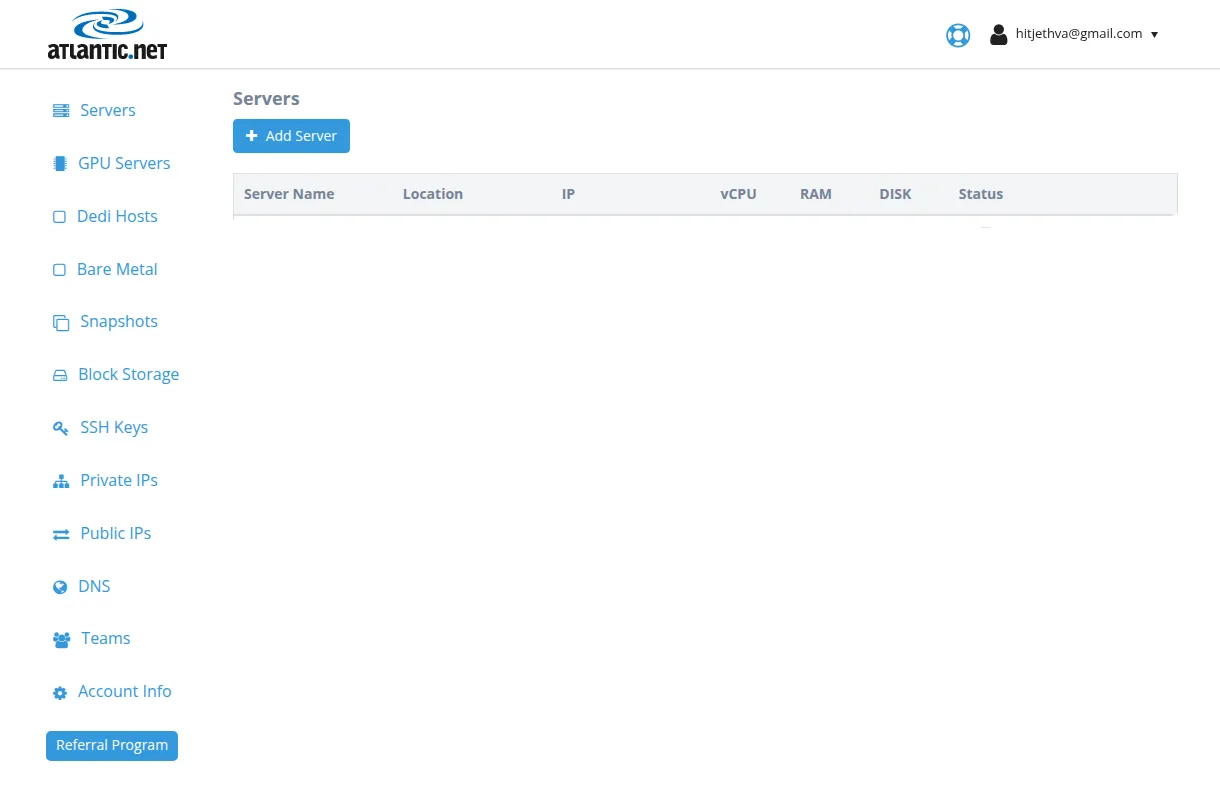
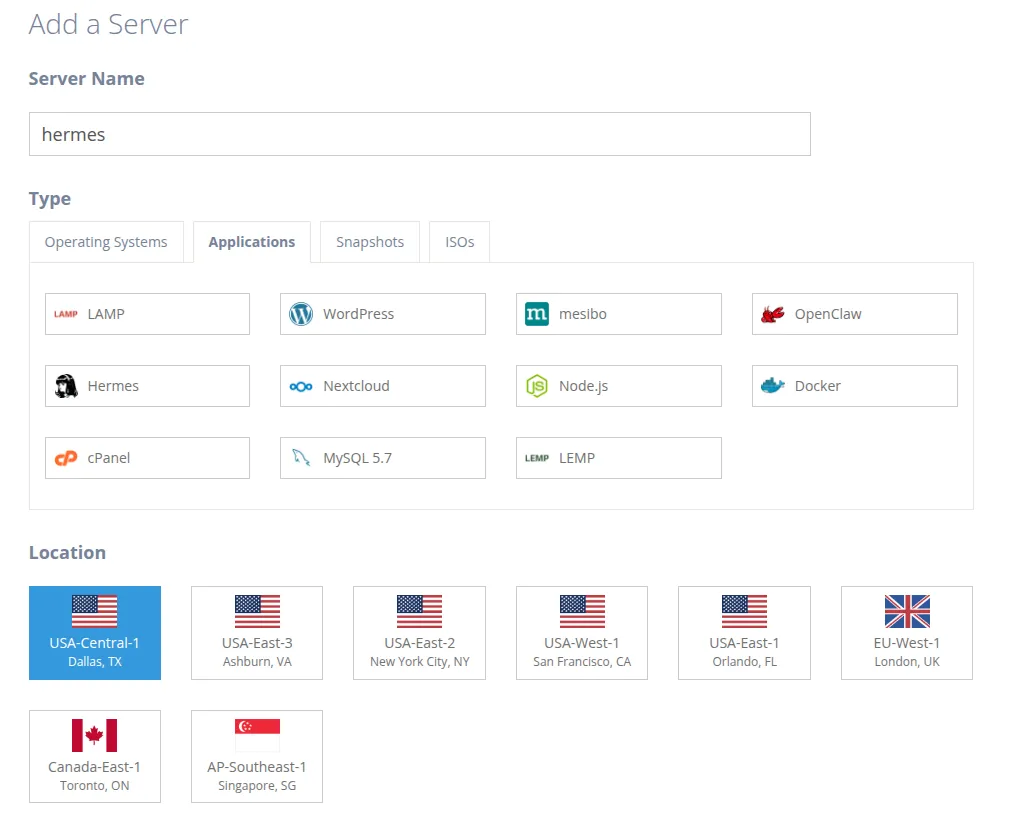
Enter a descriptive name in the Server Name field. Open the Application tab and select Hermes. Next, choose the nearest location.
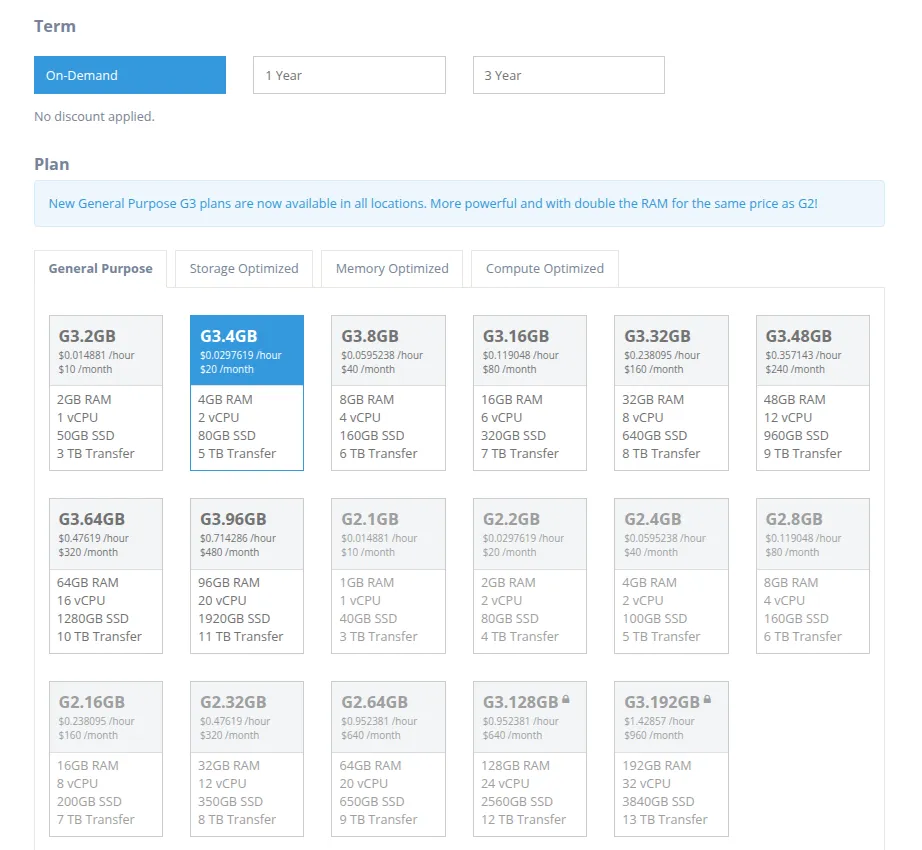
Next, select a billing term and a server plan. Select a plan suitable for the tools you plan to use.
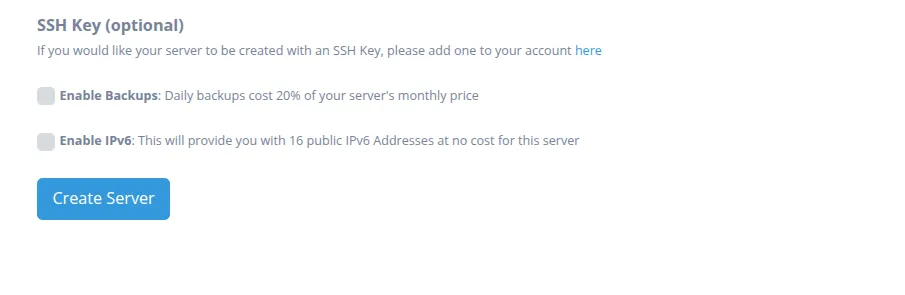
Click Create Server.
Wait until the deployment status changes to active. The server details page displays the public IP address and login information. Keep these credentials private.
Next, open a terminal on your local computer and connect to the new Hermes instance through SSH:
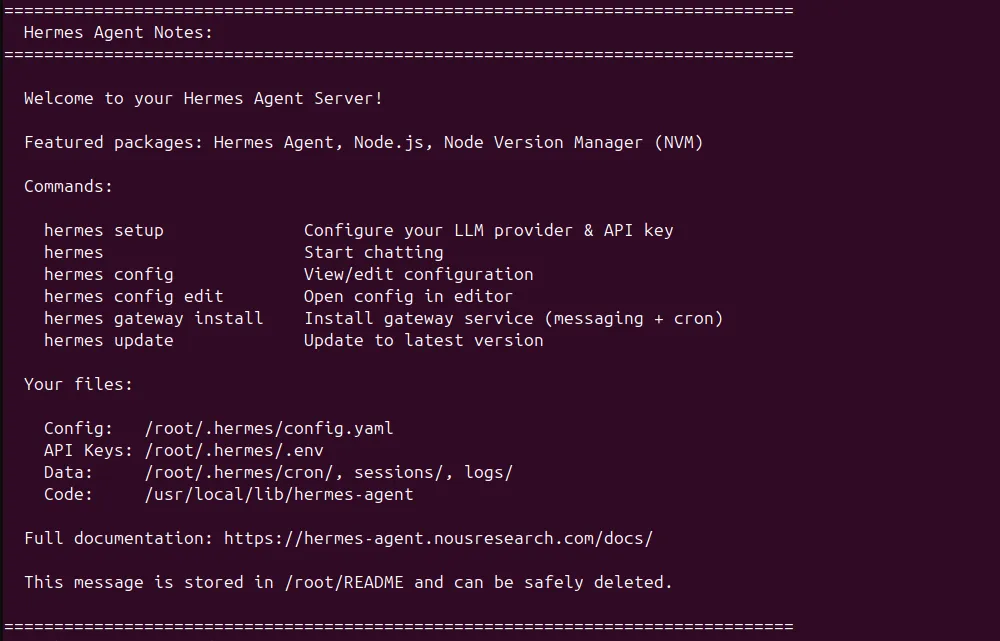
ssh root@YOUR_HERMES_IPReplace YOUR_HERMES_IP with the public IP displayed in the Atlantic.Net control panel. Accept the SSH host key and enter the provided password. The Hermes welcome screen should appear.
Method 2 – Install Hermes On An Ubuntu 24.04 Server Manually
Connect to your Ubuntu server as root or as a user with sudo access. Update the APT package index and install the small set of packages required by the Linux installer:
apt update -yapt install -y curl git xz-utilsRun the official Hermes Agent one-line installer. This setup wizard configures the model provider and default model in under five minutes.
curl -fsSL https://hermes-agent.nousresearch.com/install.sh | bashThe installer adds Python, Node.js, other dependencies, a virtual environment, the Hermes code, and the global hermes command. Root-mode installs normally use /usr/local/lib/hermes-agent and /usr/local/bin/hermes; per-user installs use ~/.hermes/hermes-agent and ~/.local/bin/hermes.
Reload the shell so the new PATH takes effect:
source ~/.bashrcUpdate the installation and confirm the installed version:
hermes update --yeshermes --versionAt the time of writing, the stable release is Hermes Agent v0.19.0. Your output may show a newer version.
Complete The Hermes Setup Wizard
Hermes needs at least one language model provider before it can answer prompts. You can use Nous Portal for one-account model routing and managed tools, or configure API keys for providers such as OpenAI, Anthropic, OpenRouter, DeepSeek, Gemini, and others.
Option 1: Configure Nous Portal
Nous Portal is the simplest full setup because a single OAuth login can configure model access and route supported tools such as web search, image generation, text-to-speech, and cloud browser use.
On a Hermes server, start the device-code authentication flow:
hermes auth add nous --type oauth --no-browserHermes prints a unique verification URL and user code.
Starting Hermes login via Nous Portal...
Portal: https://portal.nousresearch.com
To continue:
1. Open: https://portal.nousresearch.com/manage-subscription?user_code=7QR4-67XC
2. If prompted, enter code: 7QR4-67XC
Waiting for approval (polling every 1s)...
Now, open the URL https://portal.nousresearch.com/manage-subscription?user_code=7QR4-67XC in a browser on your local computer, sign in to Nous Portal, and approve the connection. The code is temporary and single-use.
Note: If the portal opens the subscription page, select a free plan or add credits when required. Paid models cannot run when the account has insufficient balance.
Complete the one-shot Portal configuration:
hermes setup --portalThis sets Nous as the provider and enables the Tool Gateway. If the setup wizard shows an existing value, select Keep Current unless you intend to replace it.
Hermes supports 24+ LLM providers and 200+ models. You can setup the model provider using:
hermes modelChoose Nous Portal, select an available model, and confirm the toolsets you want to enable. Free model availability changes, so use the current picker.
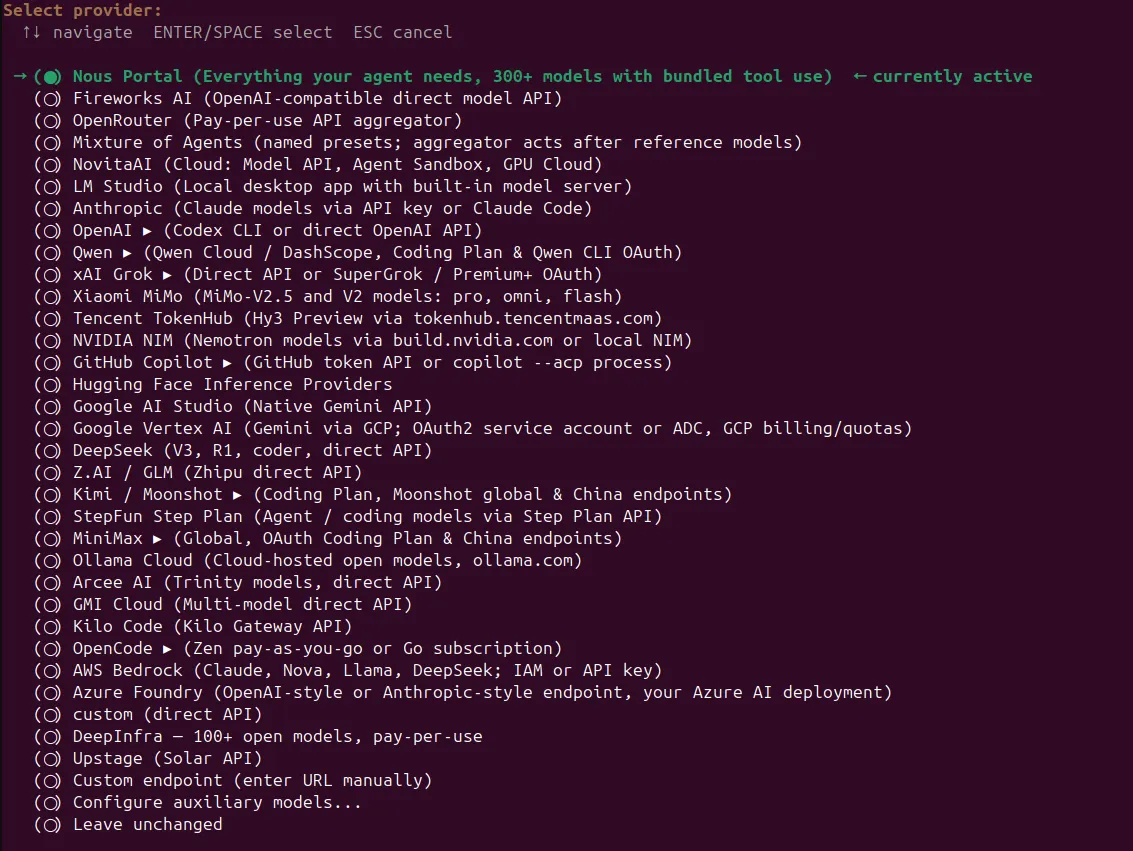
Select Nous Portal in the provider picker and press Enter.

Choose an available model and press the Enter key.
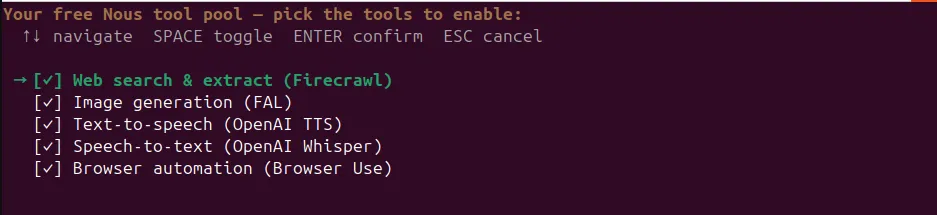
Enable the required Hermes tools and press Enter.
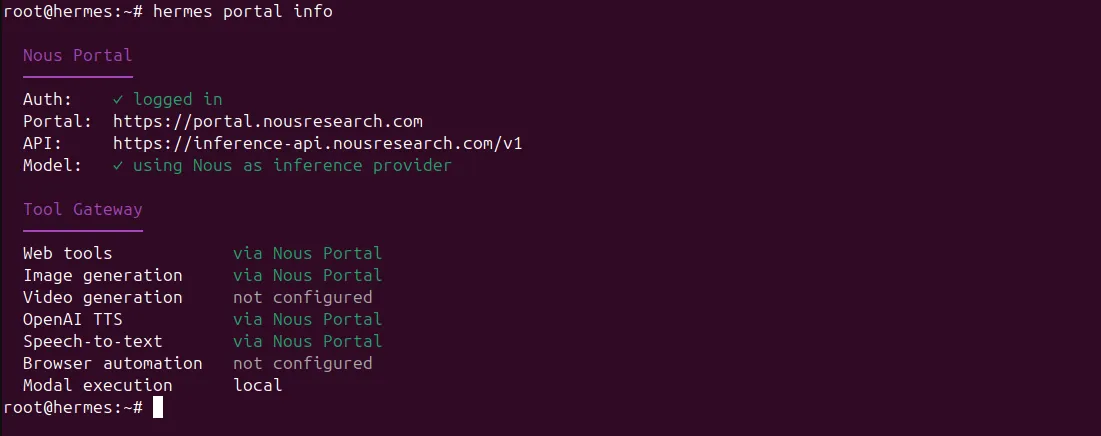
To inspect provider configuration, model routing, and token usage, use the provider-specific commands.
hermes portal infoOutput.
Option 2: Configure OpenAI, Anthropic, Or OpenRouter
Run the provider setup wizard:
hermes modelSelect your preferred LLM provider, enter the requested API key or complete its OAuth flow, and choose a default model. Hermes can switch providers at any time by running hermes model again.
You can also save common API keys directly:
hermes config set OPENROUTER_API_KEY sk-or-your-keyhermes config set OPENAI_API_KEY your-openai-keyhermes config set ANTHROPIC_API_KEY your-anthropic-keyHermes stores secrets in ~/.hermes/.env and non-secret settings in ~/.hermes/config.yaml. Do not publish either file or commit it to a public repository.
Validate The Installation
Run Hermes Doctor after the initial provider setup:
hermes doctorHermes Doctor checks the environment, configuration, credentials, tools, browser dependencies, messaging, and missing packages. Apply supported repairs with:
hermes doctor --fixIf Hermes reports an invalid API key, exit the agent and run hermes model to enter a valid credential. For missing or stale configuration values, use:
hermes config checkhermes config migrateRun Hermes Agent
Start the command-line interface:
hermesYou will see the Hermes shell.
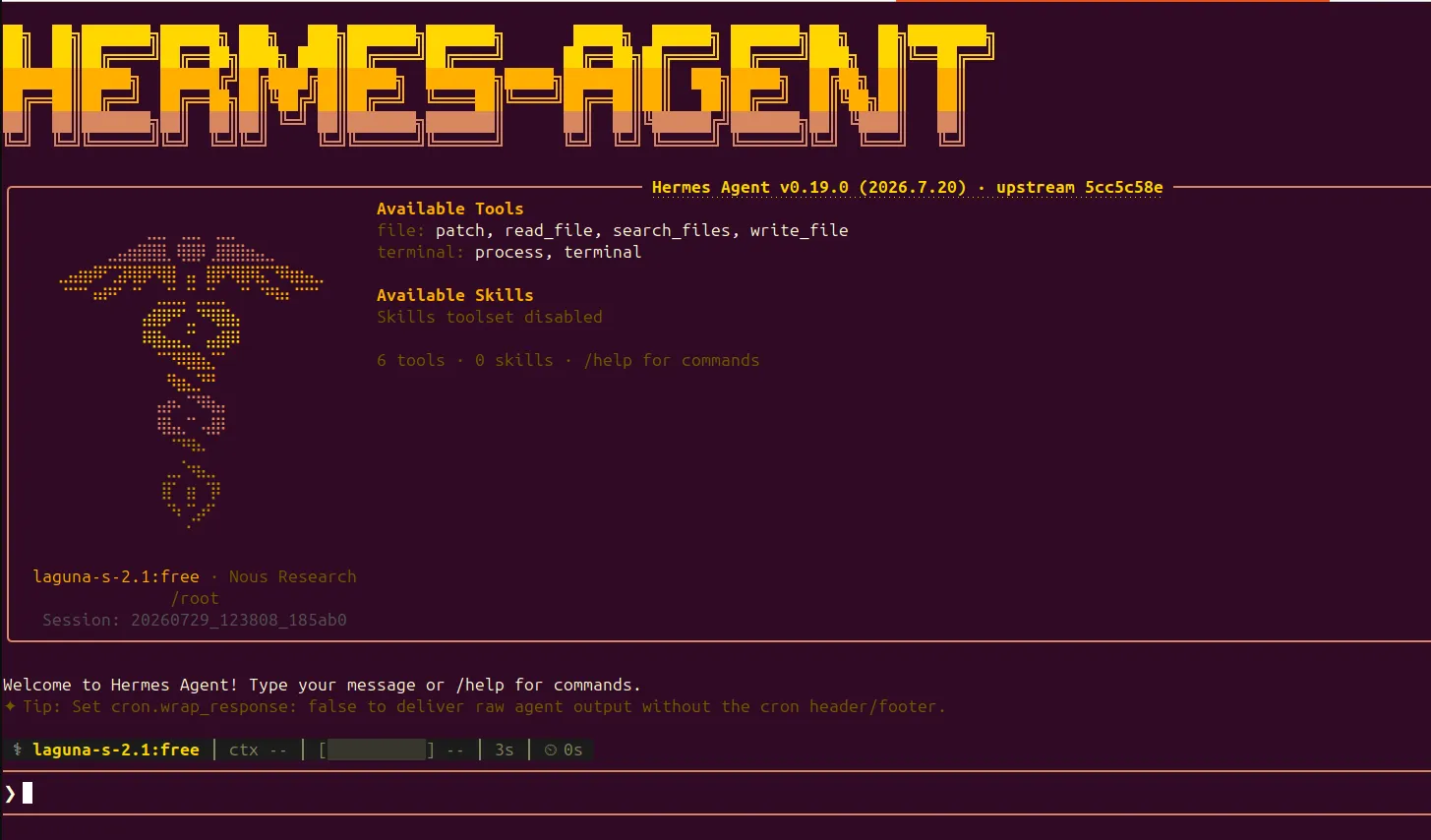
Inside the Hermes shell, open the model picker:
/modelThe in-session /model command only switches among configured models. Use hermes model from the Ubuntu shell to add a provider.
Test the agent with a safe prompt:
Check the Ubuntu version, available memory, and disk usage on this server.Hermes can run the required shell commands and summarize the result. Because the local backend executes on Ubuntu, review approvals carefully.
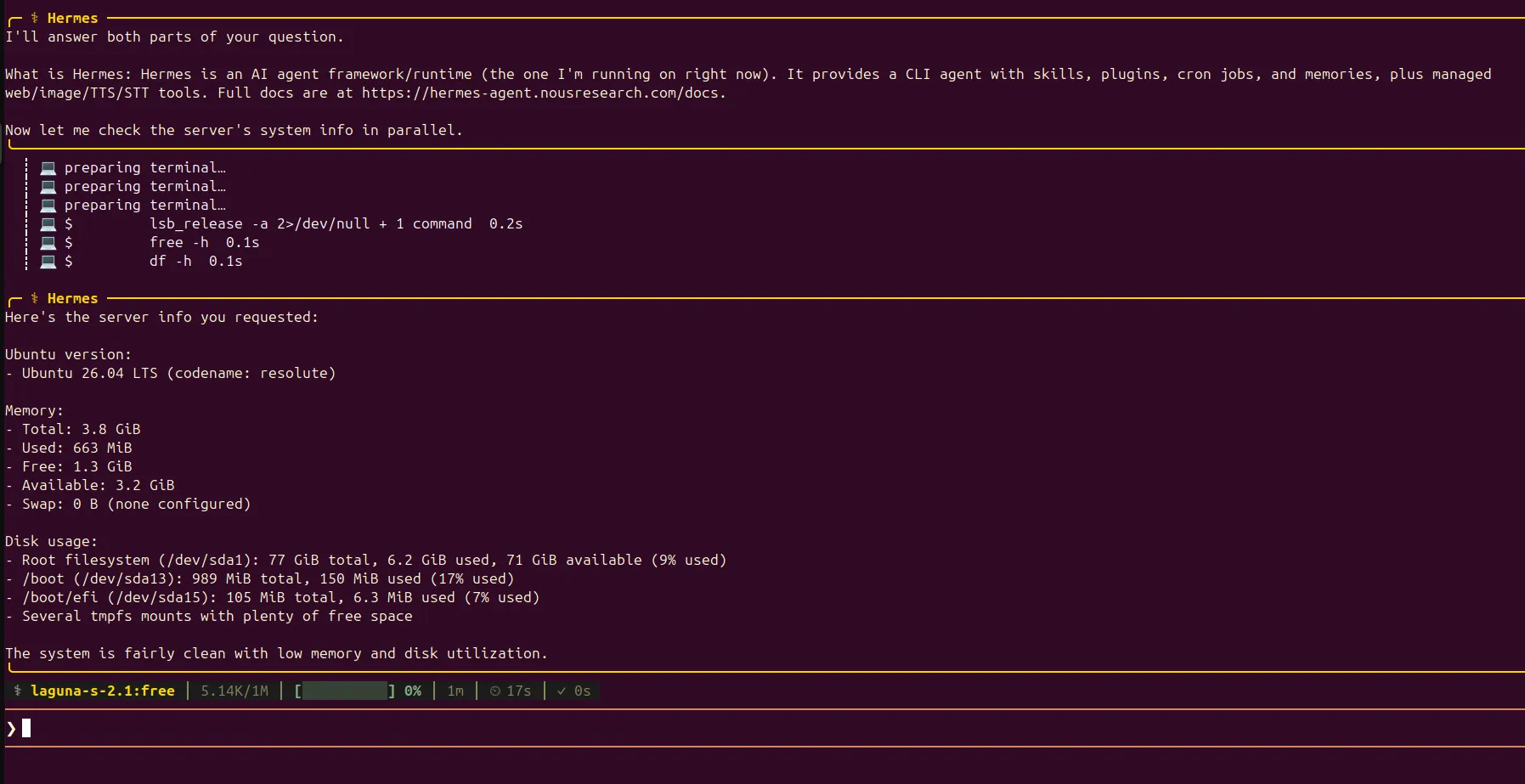
Hermes supports lots of useful slash commands including /help, /tools, /model, /save, /new, and /status.
Resume the most recent session with:
hermes --continueConfigure Hermes Tools And Terminal Backends
Open the tools configuration interface:
hermes toolsYou can enable different toolsets for the CLI, messaging platforms, and cron jobs. Enable only what you need.
Hermes uses the same configuration pattern for several terminal backends: local runs commands on Ubuntu; docker provides an isolated container; ssh executes on another remote server; modal and daytona use managed cloud workspaces; and singularity targets Singularity or Apptainer environments.
For stronger isolation, install Docker and switch the backend:
hermes config set terminal.backend dockerReturn to direct host execution with:
hermes config set terminal.backend localConfigure The Hermes Gateway
The Hermes gateway is the background process used for multi-platform messaging and scheduled tasks. First, configure one or more messaging platforms:
hermes gateway setupThe wizard supports Telegram, Discord bot, Slack, WhatsApp, Signal, and other adapters. Telegram needs a bot token and authorised Telegram user ID. Discord needs a bot token and Message Content Intent.
Install and start the default user gateway service:
hermes gateway install
hermes gateway start
On a Linux server that must start Hermes at boot, install a system-level service:
hermes gateway install --system
hermes gateway start --system
Create Hermes Cron Jobs
Hermes cron can run one-time or recurring tasks through the built-in cron scheduler. The gateway must remain running because it checks for due jobs.
Create a disk-usage check every two hours:
hermes cron create "every 2h" "Check server disk usage and report any filesystem above 80 percent"Create a daily AI news summary at 9:00:
hermes cron create "0 9 * * *" "Search for important AI news and send me a concise summary"List jobs and check the scheduler:
hermes cron list
hermes cron status
Inspect recent execution history with:
hermes cron runs JOB_ID --limit 20The older Hermes cron logs command may appear in outdated guides. Current releases store execution history in the cron ledger. You can also inspect the main logs with:
hermes logs agent --follow
hermes logs errors --follow
How Hermes Persistent Memory Works
Hermes Agent uses persistent memory to retain useful context across sessions through three layers:
- MEMORY.md stores project details, environment facts, and learned information.
- USER.md stores user preferences and communication style.
- ~/.hermes/state.db stores searchable CLI and messaging session history.
Memory files are located in:
~/.hermes/memories/Hermes uses SQLite with full-text search to recall previous conversations when needed. This helps with recurring tasks, server details, preferred commands, and project workflows.
Never store API keys, passwords, private keys, or bot tokens in memory files.
Configure A Local Model Or Custom Endpoint
Hermes supports local and self-hosted models through open models Ollama, llama.cpp, vLLM, LM Studio, and other OpenAI-compatible endpoints.
Run:
hermes modelSelect:
Custom endpoint (self-hosted / VLLM / etc.)For Ollama, use:
http://localhost:11434/v1Hermes requires a model with at least 64,000 tokens of context for reliable agent tool use. The system prompt, available tools, schemas, and working conversation need enough working memory for multi-step operations. Models with smaller context windows may be rejected at startup.
For an Ollama service, set the context through an environment variable:
OLLAMA_CONTEXT_LENGTH=64000 ollama serveFor a systemd-managed Ollama service, run:
systemctl edit ollama.serviceAdd:
[Service]
Environment="OLLAMA_CONTEXT_LENGTH=64000"
Then restart Ollama:
systemctl daemon-reload
systemctl restart ollamaVerify the context size:
ollama psConfirm that the context column shows at least 64000.
Managing Hermes Configuration
Use these commands to manage Hermes:
hermes config
hermes config edit
hermes config check
hermes config migrate
Hermes stores its configuration, authentication, memory, skills, cron jobs, sessions, and logs in:
~/.hermes/Protect sensitive files with:
chmod 700 ~/.hermes
chmod 600 ~/.hermes/.env
Store API keys using OAuth, the setup wizard, or hermes config set instead of typing them directly into shell history.
Conclusion
You have now completed a full Hermes Agent setup using Atlantic.Net’s preconfigured Marketplace Application or the official installer script. After installation, connect Nous Portal or another LLM provider, choose a model, validate the setup with Hermes Doctor, and test a simple terminal task. From there, you can add persistent memory, reusable Hermes skills, Docker isolation, messaging gateways, and recurring cron jobs.
Start with limited tools and a non-root user. Test the basic chat before enabling messaging gateways or cron jobs. Once the core installation is stable, gradually add provider routing, Docker isolation, local models, scheduled automations, and reusable skills.
Launch Hermes in minutes to automate tasks, connect AI models, and manage workflows from your Ubuntu server.
Frequently Asked Questions
What Is The Easiest Way To Install Hermes Agent On Ubuntu?
Atlantic.Net’s Hermes Marketplace Application is the quickest deployment method because the server is provisioned with Hermes already installed. The official curl installer is the fastest manual method.
Does Hermes Agent Require An API Key?
Hermes needs model access. You can authenticate through Nous Portal OAuth or configure an API key for OpenAI, Anthropic, OpenRouter, or another supported provider.
Can Hermes Agent Use A Local Model?
Yes. Select a custom endpoint in hermes model and provide an OpenAI-compatible base URL, model name, and API key when required.
How Do I Troubleshoot Hermes Agent?
Run hermes doctor, then use hermes doctor –fix for supported repairs. Also check hermes status –all, gateway status, cron status, and the agent or error logs.

Written by
Hitesh Jethva is a regular contributor to the Atlantic.Net blog. With over 15 years of experience in Linux and open-source technologies, he founded Linux Buz, a website dedicated to Linux enthusiasts.